

Players
Open Players from the main menu. The list shows everyone you have added:
- You (the watch owner) are underlined and in brighter text.
- Everyone else has a dot after their name: filled means present, so they can be picked for a match; outlined means away, so they are left out.
CourtKeeper keeps up to 20 players.

Adding a player
Section titled “Adding a player”Scroll to + Add Player at the bottom of the list and press SELECT. Type the name, up to 12 characters, on the on-screen keyboard and confirm with the tick.
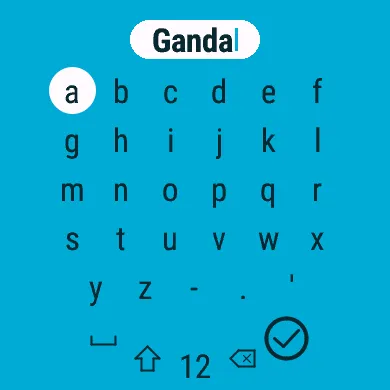
Two players cannot share a name. If the name is taken, CourtKeeper says Name already taken and lets you change it.
Changing a player
Section titled “Changing a player”Select a player to see their options:
| Option | What it does |
|---|---|
| This Is Me | Marks this player as you, the watch owner. Only one player can be. |
| Set Unavailable | Marks the player as away, so they are not offered for new matches. |
| Mark Present | Brings an away player back. |
| Delete | Removes the player. |
You are always present, so your own options leave out Set Unavailable and Mark Present.