

Scoring a match
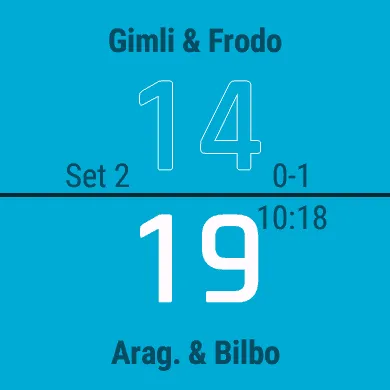
The score screen
Section titled “The score screen”- The top name and score are your opponents; the bottom ones are you (and your partner).
- The serving side’s score is solid, the other side’s is an outline, so you can tell at a glance who serves.
- Beside the line in the middle: the set you are in (top left), the sets won so far (top right), the match clock (bottom right) and, once a set has finished, the earlier sets’ scores (bottom left).
Giving points
Section titled “Giving points”| Press | To |
|---|---|
| UP | Give the point to the top side |
| DOWN | Give the point to the bottom side (you) |
| SELECT or BACK | Open the in-game menu |
On a touchscreen you can also score by touch, in the way the Scoring setting says:
| Scoring | Gesture |
|---|---|
| Halves | Tap the top or bottom half of the screen |
| Swipe | Swipe up for the top side, down for the bottom side |
Each point plays a tone and a vibration, different for your side, the other side and the match-winning point. Both can be turned off in Settings.
The rules it applies
Section titled “The rules it applies”CourtKeeper uses the BWF rally-point system:
- Every rally gives one point to the side that won it, whoever served.
- The side that won the rally serves next.
- A set goes to the first side to 21 points with a 2-point lead. From 20 all, play goes on until one side is 2 ahead.
- With 30-pt Cap on (the default), the first side to 30 wins the set, so at 29 all the next point decides it.
- The match goes to the first side to win the sets its format needs.
Serve and court positions
Section titled “Serve and court positions”In doubles and mixed, CourtKeeper follows who serves and from which court:
- When the serving side wins a rally, its players swap courts.
- When the serve changes sides, the receiving side stays where it is.
- The server serves from the right court on an even score and the left on an odd one.
To see where everyone should be, use Show Serve in the in-game menu, or turn on the Show Serve setting to see it after every point.