

DiceKeeper
DiceKeeper rolls dice on your Garmin watch: up to 12 at a time, from d4 to d100, drawn as real dice that tumble onto the screen. It remembers your last setup, so most of the time a roll is two presses: open the app, press START.

At a glance
Section titled “At a glance”| Dice | d4, d6, d8, d10, d12, d20, d100 |
| Dice per roll | 1 to 12 |
| Watches | 117 Garmin models, Connect IQ 3.1 or newer |
| Languages | 34 (see below) |
| Permissions | None. It works offline, and nothing leaves your watch. |
The main menu
Section titled “The main menu”The whole app is one menu deep, and it opens with Roll selected.
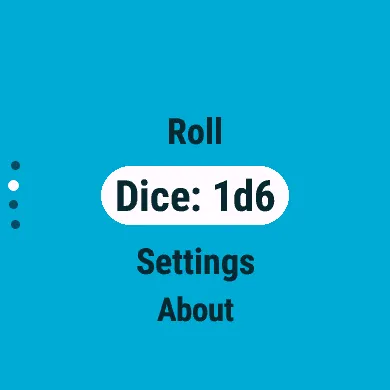
| Item | What it does |
|---|---|
| Roll | Throws your current setup straight away (Rolling dice) |
| Dice: 1d6 | Shows your setup; select it to change how many dice and which kind |
| Settings | Sound, vibration, list drag and theme (Settings and themes) |
| About | The app’s name and version |
A new install starts with one d20.
Buttons and touch
Section titled “Buttons and touch”| To | With buttons | On a touchscreen |
|---|---|---|
| Move up or down | UP / DOWN | Swipe or drag |
| Choose the item | SELECT (START) | Tap it |
| Go back | BACK | Swipe right |
BACK on the main menu asks Exit app?: SELECT leaves the app, BACK stays.
Languages
Section titled “Languages”DiceKeeper follows your watch’s language: English plus Bulgarian, Chinese (Simplified and Traditional), Croatian, Czech, Danish, Dutch, Estonian, Finnish, French, German, Greek, Hungarian, Indonesian, Italian, Japanese, Korean, Latvian, Lithuanian, Malay, Norwegian, Polish, Portuguese, Romanian, Russian, Slovak, Slovenian, Spanish, Swedish, Thai, Turkish, Ukrainian and Vietnamese.
A watch only offers the languages its own software supports (a Fenix 5 has 25 of them, a Venu 3 all of them). In any other language, DiceKeeper is in English. Dice notation, like 3d20, is the same in every language.